> ## Documentation Index
> Fetch the complete documentation index at: https://support.calderapbc.com/llms.txt
> Use this file to discover all available pages before exploring further.
# Organization customization
> Share skills, preferences, and pinned library content with everyone in your workspace.
Organization customization lets **Owners** set shared defaults for the whole workspace: pinned library content, organization-wide skills, and shared preferences. Your team starts with a consistent, pre-configured Mesa experience instead of each member building their own from scratch.
Only users with the **Owner** role can edit organization customization.
## Edit organization-wide settings
Go to **Customization** from the left sidebar.
Click the **For your organization** tab.
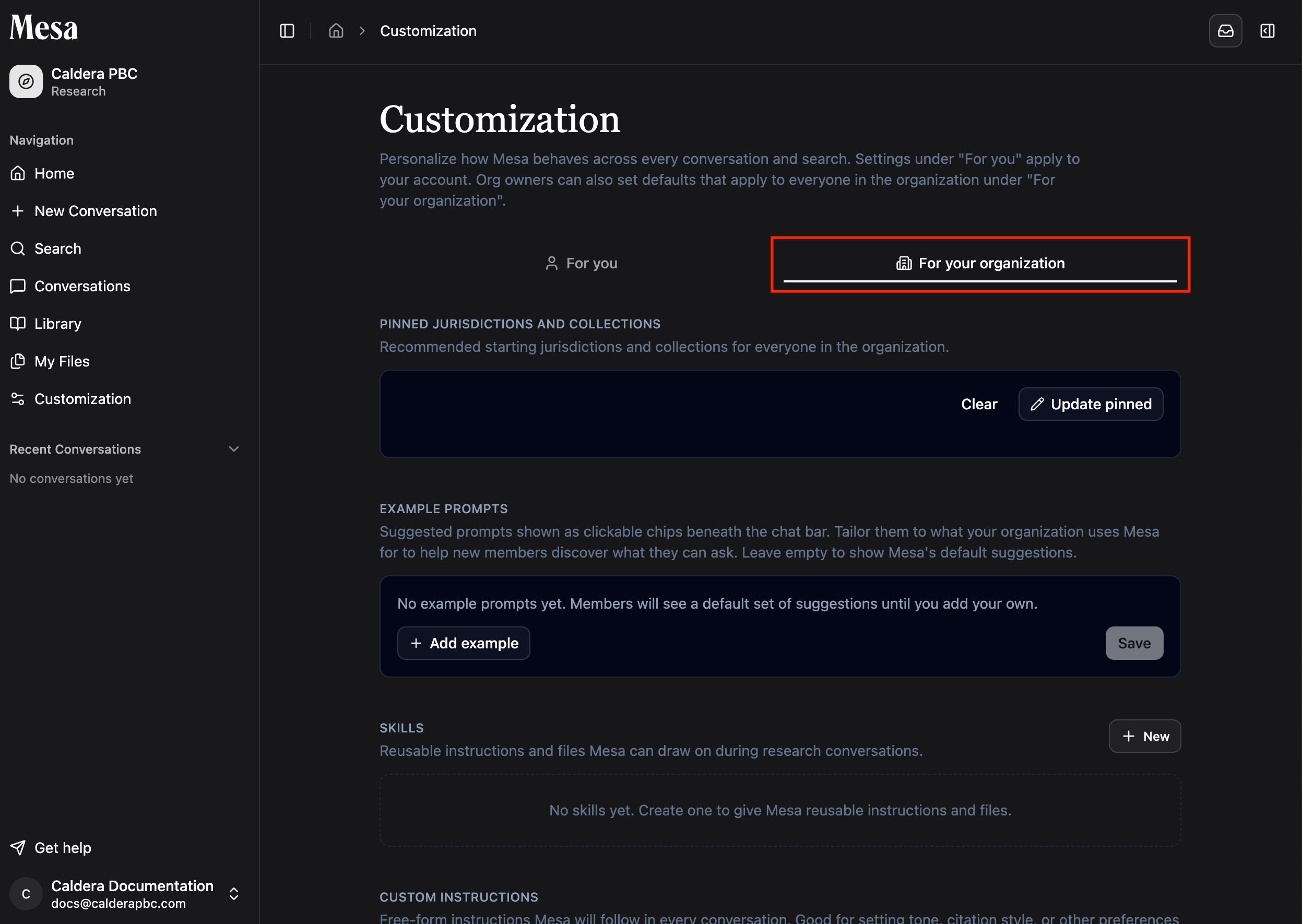 Edit the settings you want to apply organization-wide. Changes apply to the members of your organization.
## What you can customize organization-wide
* **Pinned jurisdictions and collections**: surface important Library content to all members by default.
* **Organization skills**: make shared skills available to every member.
* **Organization preferences**: apply shared custom instructions across the organization.
Pin the jurisdictions your practice relies on so every member's Library starts pre-populated with relevant content.
## Personal vs. organization customization
| | For you (personal) | For your organization |
| -------------- | ---------------------------------------------- | ---------------------------------------------------------- |
| Who it affects | Only you | All members in the organization |
| Who can edit | You | **Owners** only |
| Covers | Personal skills, preferences, and pinned items | Organization skills, preferences, and pinned library items |
## Related articles
Create the reusable instructions you can share with the organization.
Understand personal preferences before setting shared defaults.
Browse and pin the content you want to surface for your team.
Manage members, roles, and usage allocations.
Edit the settings you want to apply organization-wide. Changes apply to the members of your organization.
## What you can customize organization-wide
* **Pinned jurisdictions and collections**: surface important Library content to all members by default.
* **Organization skills**: make shared skills available to every member.
* **Organization preferences**: apply shared custom instructions across the organization.
Pin the jurisdictions your practice relies on so every member's Library starts pre-populated with relevant content.
## Personal vs. organization customization
| | For you (personal) | For your organization |
| -------------- | ---------------------------------------------- | ---------------------------------------------------------- |
| Who it affects | Only you | All members in the organization |
| Who can edit | You | **Owners** only |
| Covers | Personal skills, preferences, and pinned items | Organization skills, preferences, and pinned library items |
## Related articles
Create the reusable instructions you can share with the organization.
Understand personal preferences before setting shared defaults.
Browse and pin the content you want to surface for your team.
Manage members, roles, and usage allocations.