> ## Documentation Index
> Fetch the complete documentation index at: https://support.calderapbc.com/llms.txt
> Use this file to discover all available pages before exploring further.
# Models
> Match the right model and effort level to each task.
Mesa gives you a choice of AI models and effort levels for every conversation. Matching them to the task at hand gets you better results while making the most of your usage allocation.
## Select a model and effort level
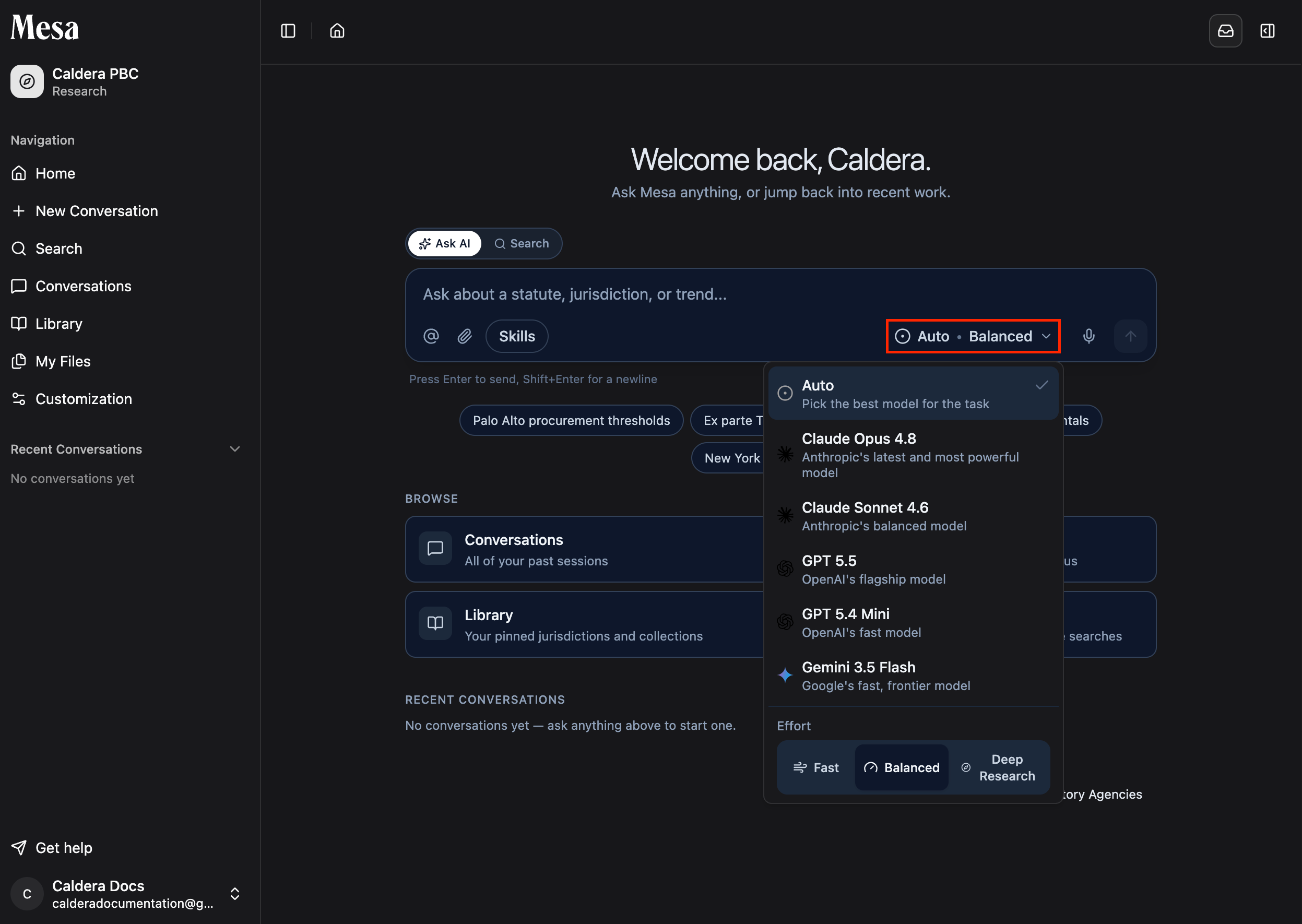
Use the dropdown above the chat box on the home page to pick a model and effort level before you send your message.
 ## Compare models
| Model | Best for | Usage |
| -------------------- | ----------------------------------------------------- | ------ |
| **Claude Opus 4.8** | Corpus research, document drafting, and complex tasks | Higher |
| **GPT 5.5** | Corpus research, document drafting, and complex tasks | Higher |
| **Claude Sonnet 5** | Short questions and simpler tasks | Lower |
| **GPT 5.4 Mini** | Short questions and simpler tasks | Lower |
| **Gemini 3.5 Flash** | Quick questions and simpler tasks | Lower |
## Compare effort levels
| Effort level | Best for |
| ----------------- | ------------------------------------------------------------------- |
| **Deep Research** | Large context, many files or documents, and deliverable-style tasks |
| **Balanced** | Intermediate document drafting and specific investigations |
| **Fast** | Quick questions and simple requests |
## Which combination should you pick?
* **Quick lookup or simple question**: a lighter model on **Fast**. You'll get an answer in seconds without dipping into your allocation.
* **Drafting a document or investigating a specific issue**: a higher-capability model on **Balanced**.
* **Comprehensive research, many documents, or a polished deliverable**: a higher-capability model on **Deep Research**. Pair it with [Notifications](/notifications) so you don't have to wait at the screen.
Higher-capability models and effort levels consume more of your allocation. See [Usage](/usage) to check how much you have left.
## Related articles
Track daily and weekly usage so you can plan your work.
A well-written prompt matters as much as the model you pick.
Use a comprehensive search mode when completeness matters more than speed.
## Compare models
| Model | Best for | Usage |
| -------------------- | ----------------------------------------------------- | ------ |
| **Claude Opus 4.8** | Corpus research, document drafting, and complex tasks | Higher |
| **GPT 5.5** | Corpus research, document drafting, and complex tasks | Higher |
| **Claude Sonnet 5** | Short questions and simpler tasks | Lower |
| **GPT 5.4 Mini** | Short questions and simpler tasks | Lower |
| **Gemini 3.5 Flash** | Quick questions and simpler tasks | Lower |
## Compare effort levels
| Effort level | Best for |
| ----------------- | ------------------------------------------------------------------- |
| **Deep Research** | Large context, many files or documents, and deliverable-style tasks |
| **Balanced** | Intermediate document drafting and specific investigations |
| **Fast** | Quick questions and simple requests |
## Which combination should you pick?
* **Quick lookup or simple question**: a lighter model on **Fast**. You'll get an answer in seconds without dipping into your allocation.
* **Drafting a document or investigating a specific issue**: a higher-capability model on **Balanced**.
* **Comprehensive research, many documents, or a polished deliverable**: a higher-capability model on **Deep Research**. Pair it with [Notifications](/notifications) so you don't have to wait at the screen.
Higher-capability models and effort levels consume more of your allocation. See [Usage](/usage) to check how much you have left.
## Related articles
Track daily and weekly usage so you can plan your work.
A well-written prompt matters as much as the model you pick.
Use a comprehensive search mode when completeness matters more than speed.